AI Agents and Automation
Not chatbots. Agents that use tools, take actions, and show their work.
What an Agent Actually Is
The word “agent” gets thrown around a lot. Most products slap it on a chatbot and call it a day. Simon Willison, one of the sharpest voices in AI tooling, offers a clear definition: “An LLM agent runs tools in a loop to achieve a goal.” That’s what OpenVolo ships — not conversational widgets, but tool-using AI systems that search the web, scrape profiles, update your CRM, and report what they did.
Benedict Evans at a16z has argued that AI agents represent the next computing platform. The bet is that software shifts from “user clicks buttons in a UI” to “user sets a goal and an agent figures out the steps.” OpenVolo is built on this premise. The 10 agents it ships aren’t features bolted onto a CRM — they’re the core architecture. The UI exists to configure, observe, and override them.
The Agent Gallery
Navigate to Automation in the sidebar to see all available agents.
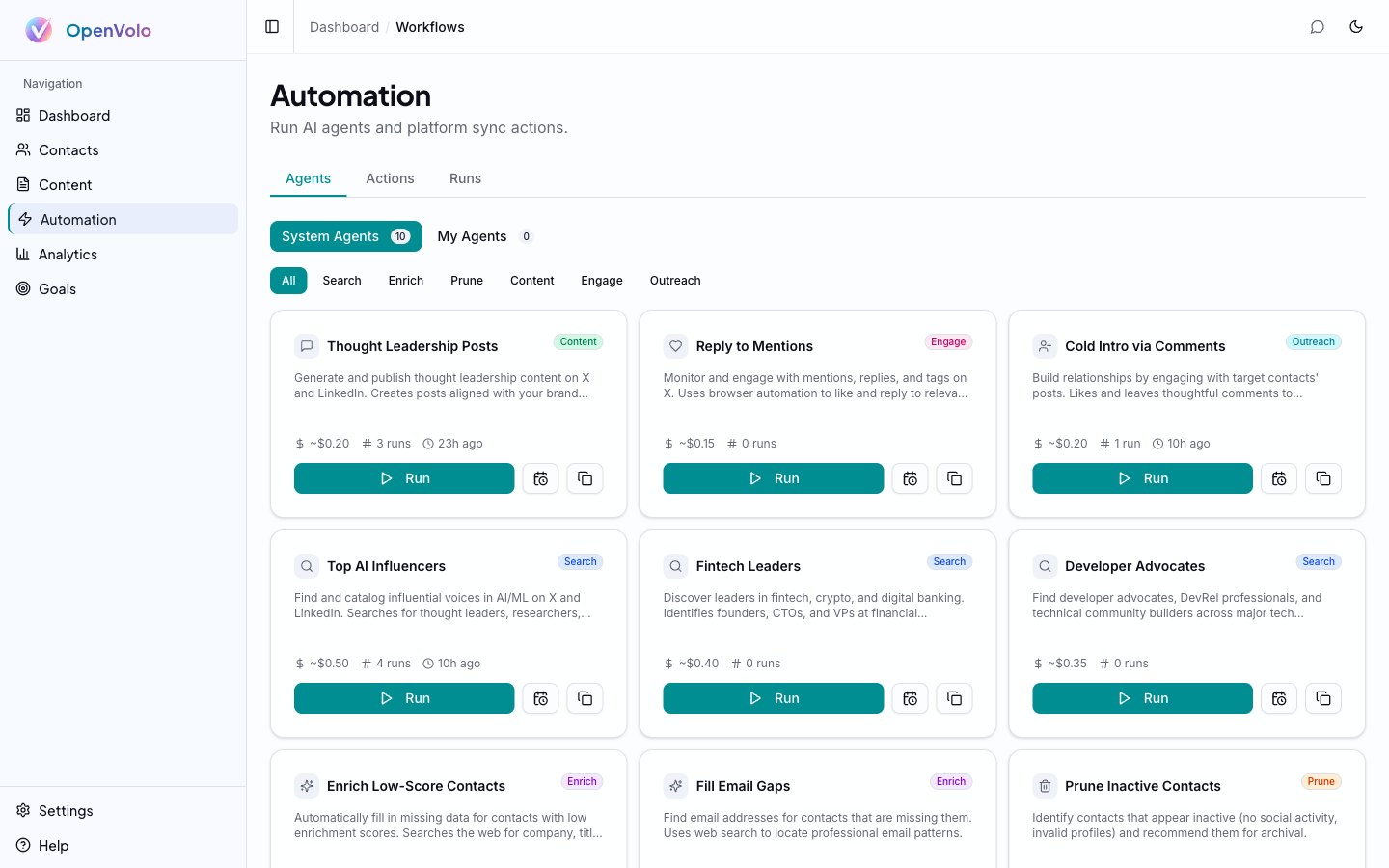 The Agent Gallery: system agents organized by category (Search, Enrich, Prune, Content, Engage, Outreach) with cost estimates, run counts, and activation buttons.
Agents are organized into six categories that mirror a typical outreach workflow:
Search Agents
Discovery — finding new people to add to your CRM.
- Top AI Influencers — Finds influential voices in AI/ML on X and LinkedIn. Searches for thought leaders, researchers, and builders across major tech companies and startups. (~$0.50/run)
- Fintech Leaders — Discovers leaders in fintech, crypto, and digital banking. Identifies founders, CTOs, and VPs at financial institutions. (~$0.40/run)
- Developer Advocates — Finds developer advocates, DevRel professionals, and technical community builders across major tech companies. (~$0.35/run)
Enrich Agents
Data completion — filling in missing information on existing contacts.
- Enrich Low-Score Contacts — Automatically fills in missing data for contacts with low enrichment scores. Searches the web for company, title, location, and social links. (~$0.50/run)
- Fill Email Gaps — Finds email addresses for contacts that are missing them. Uses web search to locate professional email patterns. (~$0.40/run)
Prune Agent
List hygiene — keeping your CRM focused on active, relevant contacts.
- Prune Inactive Contacts — Identifies contacts that appear inactive (no social activity, invalid profiles) and recommends them for archival. (~$0.35/run)
Content Agents
Content creation — generating and publishing posts.
- Thought Leadership Posts — Generates and publishes thought leadership content on X and LinkedIn. Creates posts aligned with your brand voice. (~$0.20/run)
Engage Agents
Relationship building — interacting with your contacts’ content.
- Reply to Mentions — Monitors and engages with mentions, replies, and tags on X. Uses browser automation to like and reply to relevant conversations. (~$0.15/run)
Outreach Agents
Cold outreach — making first contact through platform engagement.
- Cold Intro via Comments — Builds relationships by engaging with target contacts’ posts. Finds posts and leaves thoughtful, relevant comments. (~$0.20/run)
Each agent card shows:
- Category badge — Color-coded by type
- Estimated cost — Per-run cost based on typical API usage
- Run history — Number of previous runs and last execution time
- Run button — One-click activation
- Clone and edit icons — Customize agents for your specific needs
System vs. Custom Agents
The gallery has two tabs: System Agents (the 10 pre-built ones) and My Agents. System agents are templates — you can clone any of them and customize the instructions, target criteria, and behavior for your specific use case. Custom agents inherit the same toolset and execution engine.
Running an Agent
Click Run on any agent card to activate it. The agent goes through a predictable lifecycle:
- Thinking — The LLM reads its instructions and plans its approach
- Tool use — The agent calls tools: web search, browser scrape, contact update, etc.
- Iteration — Based on tool results, the agent decides whether to continue or stop
- Completion — The agent summarizes what it accomplished
Under the hood, agents use Claude via the Vercel AI SDK’s generateText() with a bounded step count (stopWhen: stepCountIs(n)) to prevent runaway loops. Each step is a complete LLM call with tool results fed back in.
Smart Search Routing
When an agent needs to search the web, OpenVolo’s routing engine automatically picks the best provider:
| Agent Type | Primary Provider | Why |
|---|---|---|
| Search agents | Serper | Broad Google results for discovery |
| Enrich agents | Tavily (advanced) | Deep research for person lookup |
| Prune agents | Tavily (basic) | Quick validation of activity |
| Content/Engage | Serper | General web context |
If the primary provider fails or isn’t configured, the system automatically fails over to the alternative. You get the best available search without configuring anything.
Step-Level Observability
Every agent run is fully observable. Click into any completed run to see the detail view.
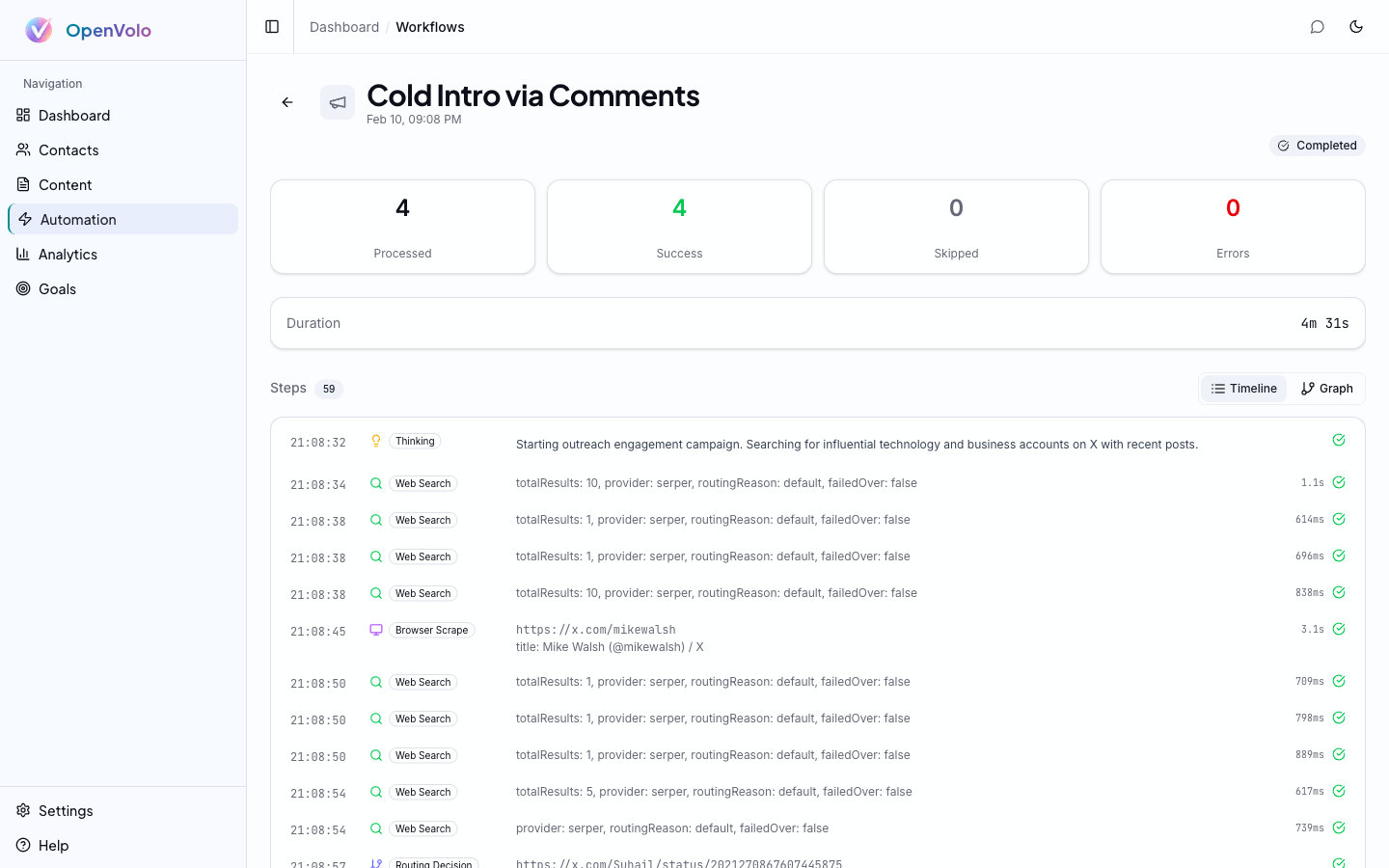 Workflow detail for “Cold Intro via Comments”: 59 steps, 4 contacts processed, 4 successes, completed in 4 minutes 31 seconds.
The detail page shows:
Summary Cards
- Processed — How many items the agent worked on
- Success — Completed successfully
- Skipped — Items the agent decided to skip (already enriched, no action needed)
- Errors — Failures with error details
- Duration — Total wall-clock time
Step Timeline
Every action the agent took, in chronological order:
- Thinking steps — The LLM’s reasoning (what it decided to do next)
- Web Search — Query, provider, result count, routing reason, failover status, and duration
- Browser Scrape — URL visited, title extracted, and scrape duration
- Contact updates — Fields modified, enrichment score changes
- Progress updates — Running tallies as the agent works
Each step shows its timestamp and duration. You can trace the agent’s entire decision chain — why it searched for something, what it found, what it decided to do with the results.
Timeline vs. Graph View
Toggle between Timeline (chronological list) and Graph (visual dependency graph) views. The graph shows how steps connect — which searches led to which scrapes, which scrapes led to which contact updates.
Workflow Scheduling
Agents don’t have to be manually triggered. OpenVolo includes a cron-based scheduler that runs agents on a recurring basis.
From the Automation page, click the schedule icon on any agent to configure:
- Cron presets — Common schedules: every hour, daily, weekly, monthly
- Custom cron — Full cron expression support for precise scheduling
- Next run preview — Shows when the agent will next execute
- Config overrides — Customize parameters per template type (different search queries, contact filters, etc.)
The scheduler runs on a 60-second interval. When a job is due, it fires the agent workflow and updates the next run time. You can enable/disable individual schedules and see last-triggered timestamps.
This is how you put your CRM on autopilot: schedule the Search agents to discover new contacts weekly, Enrich agents to fill data gaps daily, and Prune agents to clean up monthly.
Triggering Agents from Chat
Every agent can also be started from the AI Chat Assistant. Open the chat panel (Cmd+K) and say something like:
“Run the Top AI Influencers search agent”
“Enrich my low-score contacts”
“Start a prune workflow”
The chat assistant has a start_workflow tool that activates any agent template. This is often the fastest way to run an ad-hoc agent — no clicking through the gallery, just describe what you want.
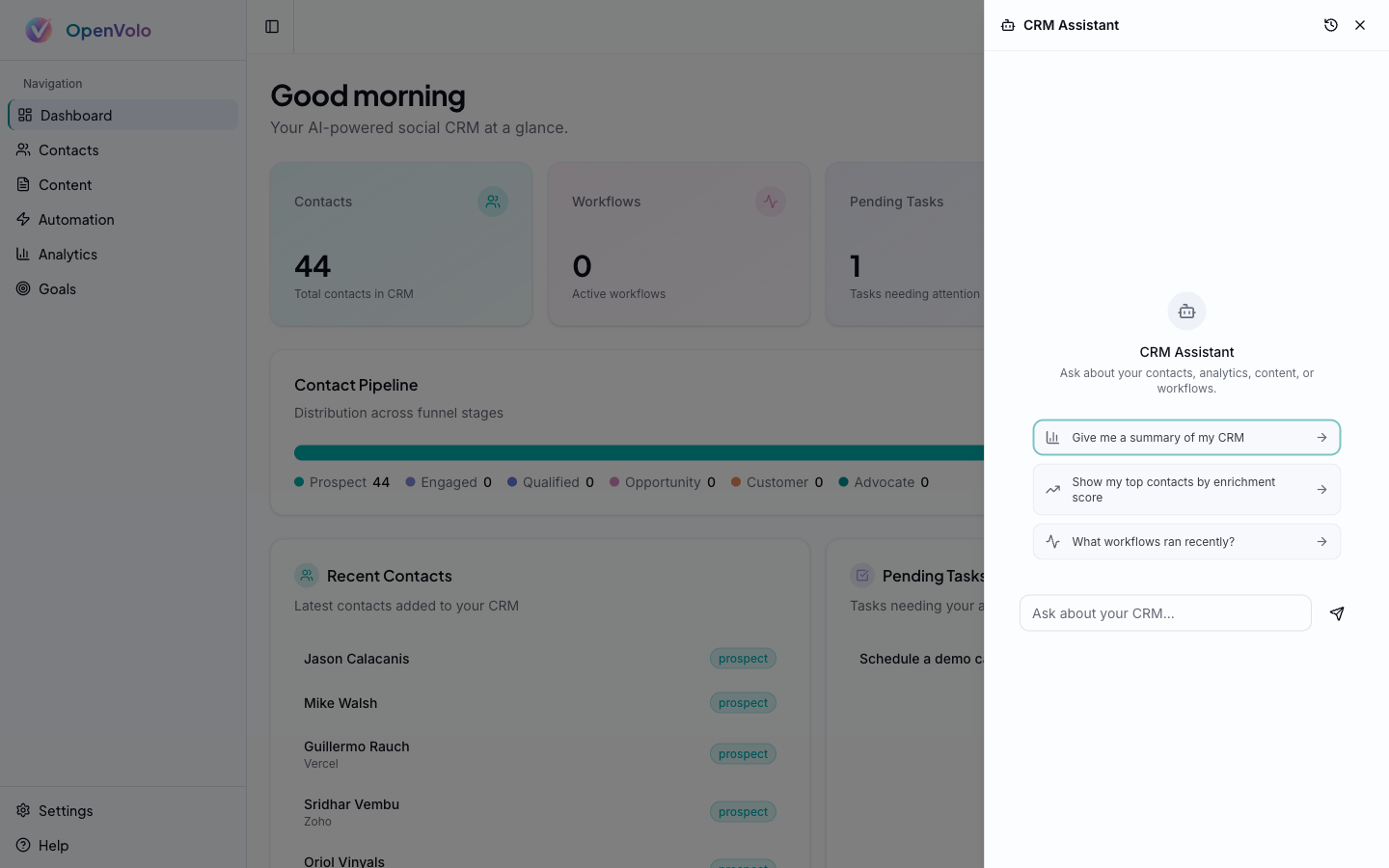 The Chat panel: smart prompts suggest common actions, and you can start any workflow with natural language.
Under the Hood: The Agent Toolset
Every agent has access to 10 tools, each doing one thing well:
| Tool | What It Does |
|---|---|
search_web | Searches via Serper or Tavily with smart routing |
url_fetch | Fetches and parses web pages (Cheerio-based) |
browser_scrape | Full browser automation for JS-rendered pages |
enrich_contact | Updates contact fields in the CRM |
archive_contact | Archives contacts (soft delete with metadata) |
update_progress | Reports progress during execution |
publish_content | Publishes posts via browser automation |
query_contacts | Reads contact data from the CRM |
query_content | Reads content library data |
query_goals | Reads goal progress data |
The routing engine decides which tools to use based on the target. X profiles get browser_scrape (the API is limited). Wikipedia pages get url_fetch (no JS needed). The agent doesn’t need to know the routing rules — it just asks to “get information about this person” and the system handles the rest.
What’s Next
Agents generate data. Analytics help you understand it. Goals give it direction.
Next: Analytics and Goals — Track agent performance, contact growth, and set demand generation targets.
Also see: AI Chat Assistant — Trigger and monitor agents through natural language.